Automating AWS Infrastructure with CloudFormation and GitHub Actions: A Tutorial

This tutorial aims to demonstrate how to deploy CloudFormation templates using GitHub Actions to create resources in the Amazon cloud. We will discuss two main tools: AWS CloudFormation and GitHub Actions.
AWS CloudFormation is an Infrastructure as Code (IaC) tool that allows you to provision AWS resources declaratively. AWS cloud resources and their relationships are declared in an AWS CloudFormation template written in JSON or YAML format. The template is deployed using the AWS CLI.
GitHub Actions allows you to automate workflows and is a suitable tool for running the AWS CLI and deploying resources to the AWS cloud. By using both tools, I will demonstrate how to create an automated process to deploy IaC and provision AWS resources repeatedly.
Key Components of AWS CloudFormation
There are four components necessary to understand when working with AWS CloudFormation:
- Templates: These are the heart of AWS CloudFormation. These templates are in JSON or YAML format and define the resources you need, such as EC2 instances, S3 buckets, or RDS databases.
- Parameters: A list of key-value pairs in JSON format to store values referenced in AWS CloudFormation templates.
- Resources: These are AWS cloud resources, such as Amazon VPC and Amazon EC2, and their associations, such as SubnetRouteTableAssociation.
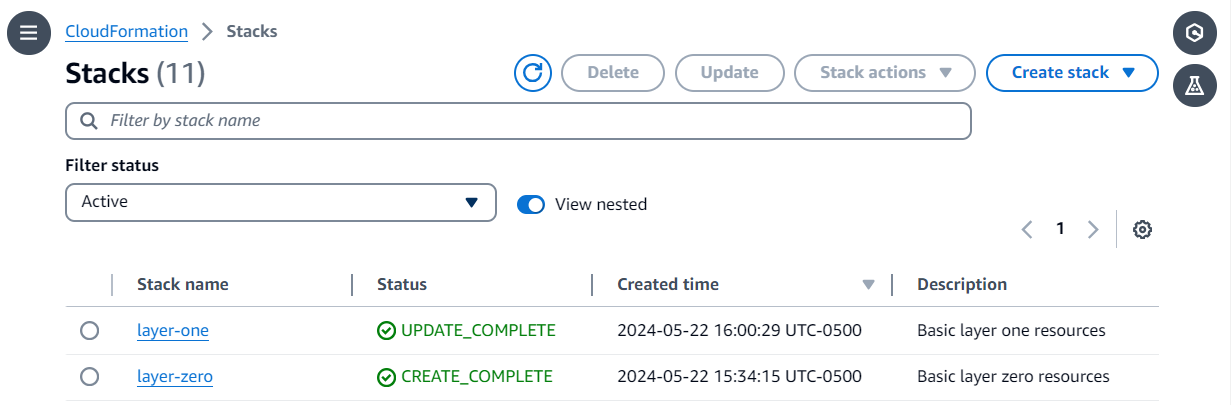
- Stacks: This is the deployed form of the template, accessible in the AWS Console. A stack contains information such as the ID, deployment status, IAM role used to deploy the stack, deployed resources, events during stack deployment, among others.
You can read more about AWS CloudFormation at AWS-Docs: CloudFormation.
Prerequisites: Configure AWS Credentials for GitHub Actions
To authenticate with AWS from your GitHub Actions workflow, you will need to configure AWS credentials. This use case requires two AWS IAM roles: one to authenticate to the AWS cloud from the GitHub workflow and another to deploy the AWS CloudFormation template.
Follow the steps in this detailed guide to set up the AWS IAM role required to authenticate to the AWS cloud and store them as a GitHub repository secret.
The first IAM role (IAM_ROLE in the code repository), in addition to the trust relationship policy (with GitHub, explained in the detailed guide), has a permissions policy. The permissions policy is stored in the GitHub repository as ./iam_policy/github_permission.json. Please replace ${replace-with-arn-of-IAM-role-stored-as-secrets.CFN_ROLE} with the ARN of the second IAM role.
The second IAM role (CFN_ROLE in the code repository) has two policies: a trust policy and a permissions policy. The trust policy is stored in the GitHub repository as ./iam_policy/cloudformation_permission.json. Please replace ${replace-with-arn-of-IAM-role-stored-as-secrets.IAM_ROLE} with the ARN of the first IAM role. The permissions policy must also have permission to manage AWS cloud resources, as mentioned in the two template files stored in the templates folder.
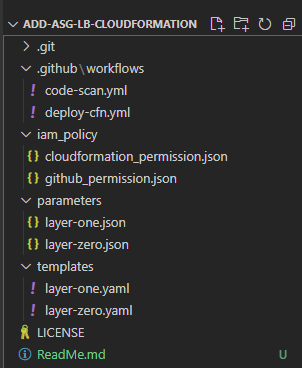
I have the code stored in my GitHub repository: add-asg-lb-cloudformation, and you can follow it to learn more.
The code repository is divided into four folders:
- The
templatesfolder contains the AWS CloudFormation templates to deploy AWS cloud resources. - The
parametersfolder contains the key-value property pairs used in the AWS CloudFormation templates. - The
iam_policyfolder contains the IAM policies for the two roles used in this project. - Finally, the
.github/workflowsfolder contains the logic to deploy the templates with the parameters in a repeatable process.
For this example, I chose two templates. The first one (layer-zero.yaml) is to create an Amazon VPC with four subnets. Two subnets have an Internet Gateway attached, while the other two have NAT Gateways. The routing tables for these four subnets have appropriate associations to allow communication with the Internet. The template exports the VPC and Subnet IDs as output to be referenced in the second template.
The second template (layer-one.yaml) creates a pair of security groups with associated inbound and outbound rules. It also creates an Amazon EC2 Auto Scaling group with horizontal and vertical scaling policies using AWS CloudWatch alarms and a load balancer.
Automated Deployment Process with GitHub Actions
The deployment process is automated through the GitHub Actions workflow .github/workflows/deploy-cfn.yml. I have configured some default values, such as the working directory and pipeline permissions. After configuring this, the workflow has three main steps:
Step 1: Checkout and AWS Credentials Configuration for the workflow
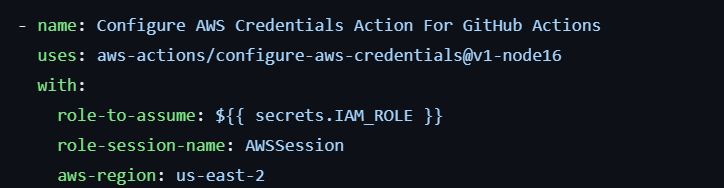
The first step is to checkout the code, followed by configuring AWS credentials for the workflow.
You will need to configure AWS credentials to authenticate with AWS from your GitHub Actions workflow. Please provide the IAM role created in the prerequisites section.
Step 2: Deploy the layer zero AWS CloudFormation template

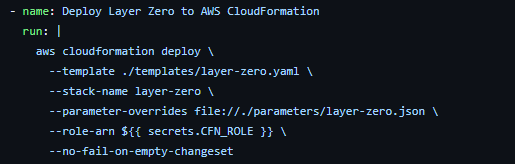
The AWS CloudFormation deployment process is classified in a layered approach, so that the upper infrastructure layers depend on the lower layers. In the following command, the AWS CLI calls the deploy function with the template, stack name, parameters, and IAM role ARN.
aws cloudformation deploy \
  --template-file templates/layer-zero.yaml \
  --stack-name my-layer-zero-stack \
  --parameters file://parameters/layer-zero-params.json \
  --capabilities CAPABILITY_NAMED_IAM \
  --role-arn arn:aws:iam::123456789012:role/CloudFormationDeployRole
Step 3: Deploy the layer one AWS CloudFormation template
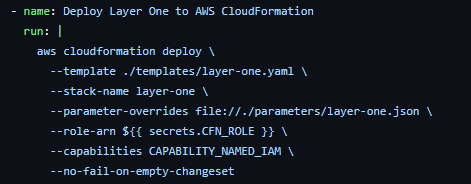
Similar to the previous step, we deploy the layer one template, which depends on the resources created in layer zero.
aws cloudformation deploy \
  --template-file templates/layer-one.yaml \
  --stack-name my-layer-one-stack \
  --parameters file://parameters/layer-one-params.json \
  --capabilities CAPABILITY_NAMED_IAM \
  --role-arn arn:aws:iam::123456789012:role/CloudFormationDeployRole
Best Practices for CloudFormation and GitHub Actions
- Modularization: Divide your CloudFormation templates into smaller, reusable modules (e.g., VPC, databases, applications) to facilitate management and maintenance.
- Version Control: Keep all your CloudFormation templates and GitHub Actions workflows in a version control system like Git.
- Testing: Implement automated tests for your CloudFormation templates (e.g., cfn-lint) and for your GitHub Actions workflows.
- Security: Use IAM roles with the minimum necessary privileges for your GitHub Actions deployments. Store credentials securely using GitHub secrets.
- Code Review: Perform code reviews for your templates and workflows to ensure quality and detect potential errors.
Common Challenges and How to Overcome Them
- Parameter Management: The limitation that parameters must be defined in both the template and the parameter file can be confusing. Make sure you have a clear strategy for parameter management.
- Rollbacks: CloudFormation deployment failures can be complex to handle. Familiarize yourself with rollback options and how to implement them in your workflows.
- Debugging: Debugging errors in CloudFormation and GitHub Actions can be challenging. Use CloudWatch logs and GitHub Actions logs to identify and resolve issues.
- Service Limits: Be aware of AWS and CloudFormation service limits to avoid issues when deploying large infrastructures.
Conclusion
Automating AWS infrastructure with CloudFormation and GitHub Actions is a powerful practice that can significantly improve the efficiency and reliability of your deployments. By following best practices and being prepared for common challenges, you can build a robust CI/CD pipeline that allows you to deploy and manage your infrastructure effectively.
I hope this tutorial has provided you with a clear understanding of how you can begin automating your infrastructure deployments in AWS. Happy automating!